WhatsApp CRM: every conversation, every customer, one view.
Manage all your customer relationships in one place—across WhatsApp.
Keep contact profiles, full chat history, tags and a sales pipeline next to your WhatsApp inbox, and sync leads to Zoho CRM or Zoho Bigin when you need a wider sales system.

Contact Profiles
Build unified customer profiles with complete conversation history across WhatsApp, enriched with tags, attributes, and custom fields for better context and personalization.
Sales Pipeline
Monitor and manage deals visually from lead to customer at every stage, including leads captured from and direct messages.
Activity Tracking
Automatically record all customer interactions, messages, and key events from WhatsApp in a single, centralized activity timeline.
Smart Tagging
Organize and segment contacts using custom tags based on behavior and engagement on WhatsApp, enabling more targeted campaigns.
Analytics Dashboard
View real-time insights into sales performance, customer engagement, and team productivity across WhatsApp conversations.
Data Export
Export customer data, interaction histories, reports, and analytics for external analysis, compliance, and secure backups.
Real CRM. Real Results.
See how businesses use WhatsApp CRM to manage customer relationships, close deals, and grow revenue.
Sales Management
Track leads, manage opportunities, and close deals faster with structured pipelines on WhatsApp.
- Capture leads from WhatsApp chat interactions
- Add leads to the sales pipeline
- Track conversations and engagement
- Move deals through each stage
- Close deals and record outcomes

Contact Management
Access and manage detailed customer profiles, conversation history, and key data from WhatsApp—all in one place.
- View complete customer profiles
- Access full conversation history
- Track preferences and attributes
- Organize and update customer data
- Maintain accurate records

Customer Insights & Analytics
Track customer growth, analyze lead sources, and understand engagement patterns across WhatsApp to make smarter business decisions.
- Analyze customer acquisition sources
- Track growth and customer trends
- Monitor engagement and activity
- Identify high-performing channels
- Make data-driven decisions

Ownchat is a WhatsApp CRM and WhatsApp Business API platform made by Ieyal Solutions, an official Meta Business Partner in Thiruvarur, India. It gives small and mid-sized teams in India, Singapore and the UAE contact profiles, chat history, tags, a sales pipeline and Zoho CRM sync. Plans start at $12 per month, billed annually.
Key Specifications
- Meta Business Partner
- Yes, official
- Businesses using Ownchat
- 300+
- Entry price
- $12/month billed annually ($18 billed monthly)
- Free trial
- 14 days, no credit card
- CRM integrations
- Zoho CRM, Zoho Bigin (Ownchat is a Zoho Partner)
- Support hours
- Mon–Fri, 9am–6pm IST (11:30am–8:30pm SGT, 7:30am–4:30pm GST)
What is a WhatsApp CRM?
A WhatsApp CRM is customer relationship software that is built around WhatsApp conversations. Instead of copying chat details into a spreadsheet or a separate CRM, each customer's profile, message history, tags and deal stage sit next to the chat itself.
It runs on the official WhatsApp Business API, not on the WhatsApp Business app on one phone. That means several team members can reply from the same number, every message is stored against the right contact, and you can send approved template messages, broadcasts and automated replies within Meta's rules.

Live Production Interface · Verified Meta Business Partner
What does the Ownchat WhatsApp CRM include?
These are the CRM features on Ownchat today. Each one works with the shared team inbox, chatbots and broadcasts on the same platform.
Contact profiles
one profile per customer with the full WhatsApp conversation history, enriched with tags, attributes and custom fields.
Sales pipeline
see deals move visually from lead to customer, stage by stage, including leads that arrive through chats and direct messages.
Activity tracking
customer messages, interactions and key events are recorded automatically in one activity timeline.
Smart tagging
tag and segment contacts by behaviour and engagement on WhatsApp, then target campaigns at those segments.
Analytics dashboard
real-time views of sales performance, customer engagement and team productivity across WhatsApp conversations.
Data export
export customer data, interaction histories, reports and analytics for outside analysis, compliance records or backups.

Live Production Interface · Verified Meta Business Partner
How do sales and support teams use a CRM with WhatsApp?
Sales management. Capture leads from WhatsApp chats, add them to the pipeline, track the conversation and engagement, move each deal through its stages, and record the outcome when it closes.
Contact management. Open any customer and see their profile, their full conversation history, their preferences and attributes. Update the record as you talk so the next agent has the right context.
Customer insights. See where customers come from, how the base is growing, and which channels and campaigns bring the most engaged leads, so you can decide where to spend time and budget.

Live Production Interface · Verified Meta Business Partner
What does a WhatsApp CRM look like for a Singapore or UAE business?
The examples below are illustrations of how the features fit together, not customer case studies.
A tuition centre in Singapore. Parents ask about class times on WhatsApp. Each enquiry becomes a contact, tagged by level and subject. A chatbot collects the student's level and preferred slot, the enquiry appears as a lead in the pipeline, and a staff member confirms the trial class from the shared inbox. Before any promotional message goes to a +65 number, the centre checks its Do Not Call obligations under Singapore's PDPA.
A furniture showroom in Dubai. Shoppers click a Click-to-WhatsApp ad on Instagram. Each chat is tagged with the product they asked about, the sales team moves the lead from enquiry to quotation to order, and a payment link is sent in the chat. Under Meta's rules, a conversation that starts from a Click-to-WhatsApp ad opens a free entry window of up to 7 days if the business replies within the service window.
A trading company serving both markets. One Ownchat workspace handles WhatsApp and Instagram for both countries. Contacts are tagged by country, broadcasts are scheduled for each time zone, and deals sync to Zoho CRM so management sees one pipeline.
Live Production Interface · Verified Meta Business Partner
Does Ownchat offer a Zoho CRM WhatsApp integration?
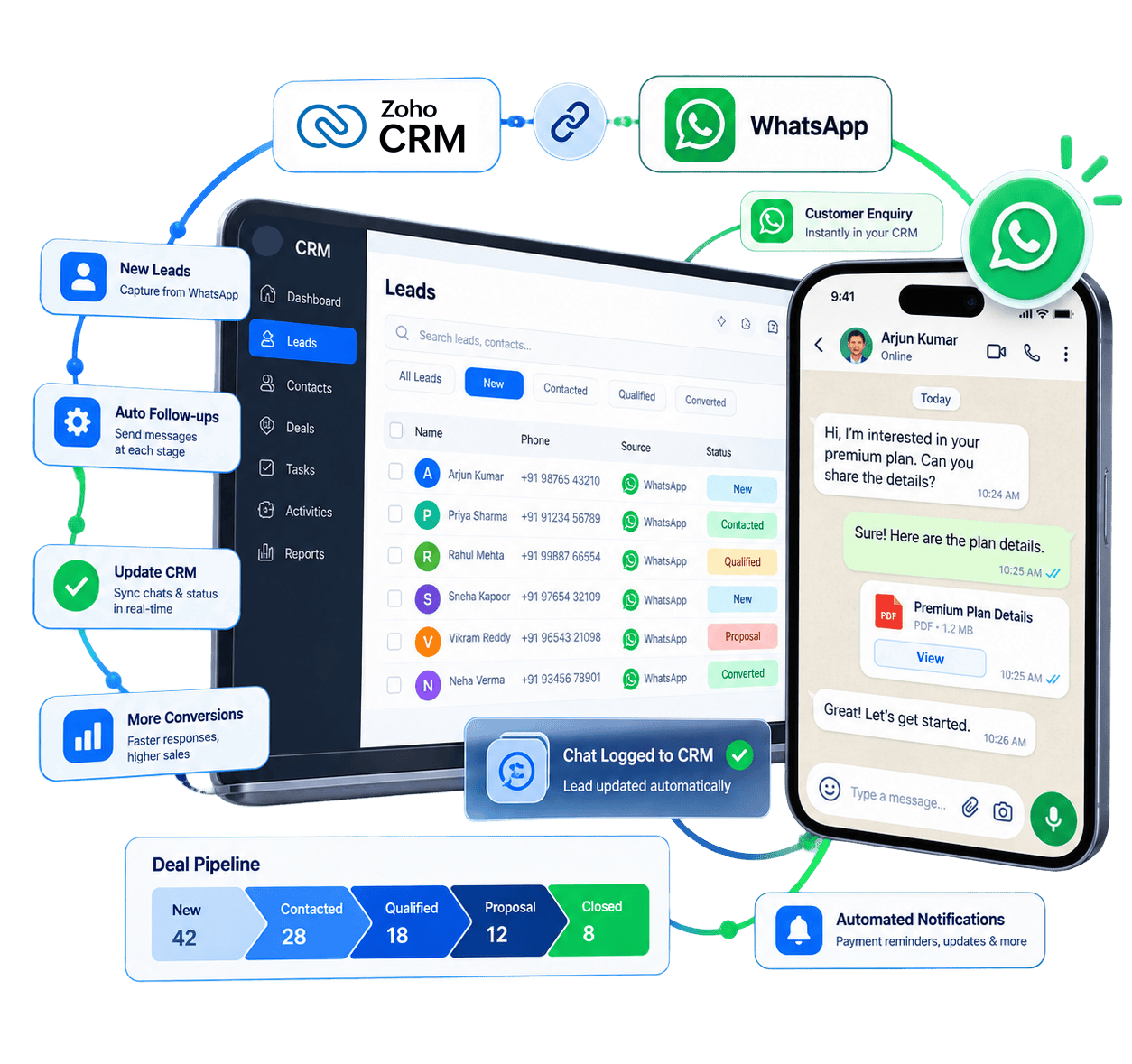
Yes. Ownchat is a Zoho Partner and connects to Zoho CRM through one-click OAuth inside the Ownchat dashboard, with no coding. After that you set lead routing rules, pipeline stage triggers, custom module mappings and message templates.
For smaller teams on Zoho Bigin, a separate integration captures WhatsApp chats as Bigin contacts, sends WhatsApp updates when a deal moves stage, and logs chats under the Bigin contact.
New WhatsApp contacts can
be created automatically as leads or contacts in Zoho CRM.
Deal stages in Zoho
CRM can update when a customer answers chatbot questions or taps a WhatsApp button.
WhatsApp chat logs and
notes are saved to the Zoho CRM contact timeline.
You can filter Zoho
CRM contacts by tag, deal stage or lead owner and send a WhatsApp broadcast to them.
Live Production Interface · Verified Meta Business Partner
Does Ownchat integrate with HubSpot or other CRMs?
Ownchat does not list a native HubSpot integration. Its listed CRM integrations are Zoho CRM and Zoho Bigin. Plans include API access (basic on Starter, advanced webhooks on Professional, custom webhooks and advanced API on Business), so teams on another CRM can ask the Ownchat sales team whether a webhook or API connection fits their setup before they buy.
Other listed integrations include Shopify, WooCommerce, Google Sheets, Razorpay, Stripe, Calendly, Zoho Books, Zoho Bookings and Zoho Subscriptions.
Live Production Interface · Verified Meta Business Partner
How much does a WhatsApp CRM cost with Ownchat?
Subscription plans for customers outside India are billed in US dollars. Plans differ in users, contacts, chatbot flows, workflows and chat history. Ask the Ownchat team which CRM features are included on each plan. WhatsApp messages are charged separately, per delivered message, at Ownchat's published per-message prices, which are billed in USD and updated when Meta changes its rates.
Under Meta's rules, each business phone number gets 1,000 free service messages per month (since 1 October 2026), and messages customers send to you are free.
Live Production Interface · Verified Meta Business Partner
Plan | Annual billing | Monthly billing | Users and contacts |
|---|---|---|---|
| Starter | $12 | $18 | 3 users, 20,000 contacts |
| Growth (WhatsApp + Instagram) | $53 | $62 | 5 users, 50,000 contacts |
| Professional | $91 | $115 | 10 users, 100,000 contacts |
| Business | $180 | $220 | Unlimited users and contacts |
What are Ownchat's WhatsApp per-message prices for Singapore and the UAE?
These are Ownchat per-message prices in USD, effective 1 October 2026. Meta charges per delivered message by category and by the recipient's country code.

Live Production Interface · Verified Meta Business Partner
Category | Singapore (+65) | UAE (+971) |
|---|---|---|
| Marketing | $0.0878 | $0.0691 |
| Utility | $0.0192 | $0.0188 |
| Authentication | $0.0192 | $0.0188 |
| Authentication (international) | — | $0.0612 |
| Service (after 1,000 free per number per month) | $0.0192 | $0.0188 |
Is a WhatsApp business CRM compliant with PDPA and UAE rules?
The tool helps, but compliance depends on how you collect consent and what you send. In Singapore, the PDPC's Do Not Call rules cover messaging apps such as WhatsApp when the recipient uses a Singapore number, so marketing messages need a DNC Registry check or clear consent. In the UAE, the Personal Data Protection Law (Federal Decree-Law 45 of 2021) governs how you store and use customer data.
Ownchat supports this with opt-out management on broadcasts, tags to record consent, and data export for records. This is general information, not legal advice.
Live Production Interface · Verified Meta Business Partner
Why choose Ownchat as your WhatsApp CRM?
Official Meta Business Partner,
used by 300+ businesses in India, Singapore and the UAE.
CRM, shared team inbox,
no-code chatbot and broadcasts on one subscription, from $12 per month; workflows start on the Growth plan.
WhatsApp and Instagram in
one inbox from the Growth plan ($53 per month, billed annually).
Native Zoho CRM and
Zoho Bigin integrations.
Published USD per-message prices
for Singapore and the UAE.
Support Monday to Friday,
9am to 6pm IST, which is 11:30am to 8:30pm in Singapore and 7:30am to 4:30pm in the UAE. Ownchat has no local office in Singapore or the UAE; support is provided remotely by phone and email.
Live Production Interface · Verified Meta Business Partner
Frequently Asked Questions
What is the difference between a WhatsApp CRM and the WhatsApp Business app?
The WhatsApp Business app runs on one phone and stores chats on that device. A WhatsApp CRM such as Ownchat runs on the official WhatsApp Business API, so several agents share one number and every chat is saved to a customer profile with tags, history and deal stage.
Can I keep using my WhatsApp Business app number?
Yes. Ownchat supports WhatsApp Coexistence, which lets you use the WhatsApp Business app and the Cloud API on the same number without deleting or re-registering it. WhatsApp Call and Group features are not supported in Ownchat while Coexistence mode is active.
Does Ownchat have a Zoho CRM WhatsApp integration?
Yes. You connect Zoho CRM with one-click OAuth. New WhatsApp contacts can become Zoho CRM leads, deal stages can update from chat actions, and chat logs are saved to the contact timeline. A separate integration is available for Zoho Bigin.
Does Ownchat integrate with HubSpot?
Ownchat does not list a native HubSpot integration. Its listed CRM integrations are Zoho CRM and Zoho Bigin. Plans include API and webhook access, so contact sales@ownchat.app to check whether a connection fits your HubSpot setup.
How much does a WhatsApp CRM cost in Singapore or the UAE?
Ownchat plans start at $12 per month billed annually, or $18 billed monthly, in USD. WhatsApp messages are charged per delivered message at Ownchat's published prices, for example $0.0878 for a marketing message to Singapore and $0.0691 to the UAE.
Is there a free trial?
Yes. Ownchat offers a 14-day free trial with no credit card required. You can test the CRM, inbox, chatbot and broadcasts before choosing a plan.
Does Ownchat have an office in Singapore or Dubai?
No. Ownchat is run by Ieyal Solutions from Thiruvarur, India, and serves customers in India, Singapore and the UAE remotely. Support runs Monday to Friday, 9am to 6pm IST, which is 11:30am to 8:30pm SGT and 7:30am to 4:30pm in the UAE.
Can I export my customer data?
Yes. You can export customer data, interaction histories, reports and analytics for outside analysis, compliance records or backups.
Trusted by Growing Businesses
Helping Businesses Improve Customer Engagement. See how teams use WhatsApp and Instagram automation to improve response times, engagement, and conversions.


Genuine Reviews from Growing Businesses
See how businesses across India use Ownchat to improve customer engagement and conversions.
We have been working with the Ownchat team for the past two years. Earlier, we received 1500–2000 chats per day and couldn’t handle them manually. After implementing Ownchat, we now use an automated chatbot that instantly responds to customers and handles queries on time. We no longer miss customer messages, and our business continues to grow every day. Their customer success team is always available and provides excellent support whenever we need it.

Vijay
The Ownchat team is approachable, open to suggestions, and genuinely focused on improving the product experience for their users.

Senma S.
Ownchat helps us take orders directly on WhatsApp, eliminate delivery aggregator commissions, and stay connected with our customers for support and feedback — all in one place.

Gayathri
Ownchat lets us use WhatsApp programmatically while providing a very user-friendly chat interface. Having customer information directly inside the chat helps our agents resolve issues faster, even while managing hundreds of customers and thousands of messages daily. The setup process was smooth, and the team was extremely helpful.

Adi S.
We switched from another WhatsApp API to Ownchat, and running campaigns is now much easier. Our WhatsApp operations are organised and clear.
Mano
Very good experience handling bulk data. The team is friendly and provides quick responses whenever we need support.

Kowsalya
Plug AI Into Your Own Data & Integrations
Connect Ownchat workflows with your favorite tools and platforms. From e-commerce to CRM, POS to analytics — automate everything.


Ready to manage customer relationships better?
Start using WhatsApp CRM today.